Copy and paste
Data moved by hand between systems that don't talk to each other.
We build scheduled AI agents that take repetitive work off your team: research, sending, sorting, reporting and fixing what breaks. Every agent runs on a schedule, stays inside a spend cap and reports to a board anyone can read.
Copying between spreadsheets, chasing replies, rebuilding the same weekly report, checking the same inboxes. Chat-style AI tools help one person at a time and remember nothing tomorrow. An agent that runs every day, on your data, with rules and a budget, does the work whether anyone remembers to or not.
Data moved by hand between systems that don't talk to each other.
Replies, renewals and reminders that depend on someone remembering.
Numbers rebuilt by hand every week, a little different each time.
An AI agent is a program with one job, a schedule, a set of rules and access to only the systems it needs. It gathers what it needs, makes the routine decisions you've approved, does the work and logs every step. When something falls outside its rules, it stops and asks a person.
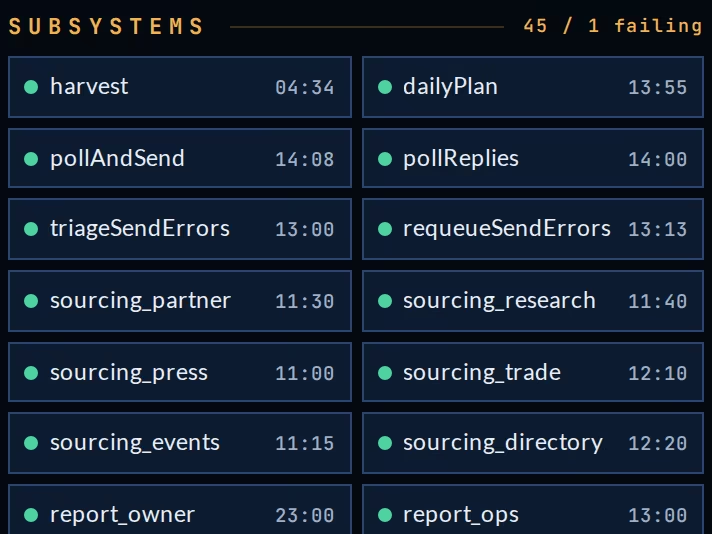
We run our own companies this way. One of our boards watches 45 agents: sourcing, sending, polling replies, sorting send errors, requeueing failures and writing the morning reports.
Runs at set times or when something happens, around the clock if needed.
Every agent has a budget for AI and service costs and stops before it goes over.
Status, last run, failures and costs on one screen you can read at a glance.
Most companies start with the one task that eats the most hours, then add agents as each one proves itself.
Find and verify companies, contacts, prices, listings or documents from the sources you name, and keep the list current.
Send emails, messages and reminders on schedule, and follow up until there's an answer.
Read incoming email, forms and tickets, sort them, route each to the right person and draft the reply.
Pull the numbers from every system each morning and deliver a brief that says what changed and what to do.
Read PDFs, scans, faxes and forms, enter the data, and keep your systems in step with each other.
Retry failed jobs, requeue errors and alert a person only when something truly needs one.
Agents act on your behalf, so the controls are built in from the first day.
Messages to customers, payments and anything that can't be undone wait for a person to approve, until you decide otherwise.
Hard limits on AI and service costs per agent, per day. An agent that reaches its cap stops and reports.
Each agent reaches only the systems and data its job needs, read-only wherever possible.
Every run, decision, error and retry is recorded with the time and the result, so you can see exactly what happened.
Agents can run on your own private AI, so sensitive data never leaves your building.
| Option | How it works | Best for |
|---|---|---|
| Our secure environment | Agents run in hardened environments we manage, connected to your systems. | Most companies |
| Your cloud | Agents run inside your own AWS, Azure or Google Cloud account. | IT-led organizations |
| Your private AI | Agents use an AI model on your own hardware, so no data goes to an outside AI company. | Sensitive data |
Every agent's last run, next run and result.
Anything failing sits at the top, with the reason.
What each agent spent today, this week and this month.
Every action in order, searchable.
A message when something needs a person.
We maintain, fix and extend the agents as your business changes.
Which task eats the most time, and where the data lives.
Jobs, schedules, rules, budgets and approvals.
On your systems, tested on real cases before anything runs live.
Monitoring, fixes and new agents as you need them.
An automation follows fixed steps: when this happens, do that. An AI agent can read, judge and write within rules you set, such as sorting an email, drafting a reply or deciding which record needs attention. We use whichever fits the job, and most systems combine both.
Not unless you want it to. Anything that leaves the company, such as customer messages and payments, waits for a person to approve. Once a task has proven itself, you can let it run on its own.
Each agent has a hard spend cap for AI and service costs, and the board shows what it spent. Our design, build and support work is covered by a monthly retainer.
No. Agents connect to the email, spreadsheets, databases and business systems you already use.
It retries, then requeues the job, and if it still can't finish it flags the failure on the board and alerts a person with the reason.
Yes. Agents can run on a private AI on your own hardware, with no data sent to an outside AI provider.
Tell us which task takes the most time. We'll tell you what an agent can take over.
Related: SMS and AI TextingEnterprise Command CenterPrivate AI